Personal agents act as intermediaries that translate human instructions into automated requests and actions across websites. A visitor might direct an agent to compare items on a retailer's site, locate help documentation, or process a transaction. From the perspective of a site operator, these interactions all register as automated traffic, creating a visibility gap that makes it hard to distinguish between beneficial activity and potential threats. While blocking all agents appears to be the safest approach, doing so risks alienating legitimate customers. Greater insight into agent behavior enables site owners to make informed decisions about what access levels align with their business needs.
Cloudflare announced the rollout of fresh analytics capabilities designed to reveal how personal agents interact with websites on behalf of users, paired with more detailed access control policies to enforce those decisions. The combination allows organizations to accept agents under conditions they define, in ways that serve their operational and business objectives.
Visibility into agent traffic patterns
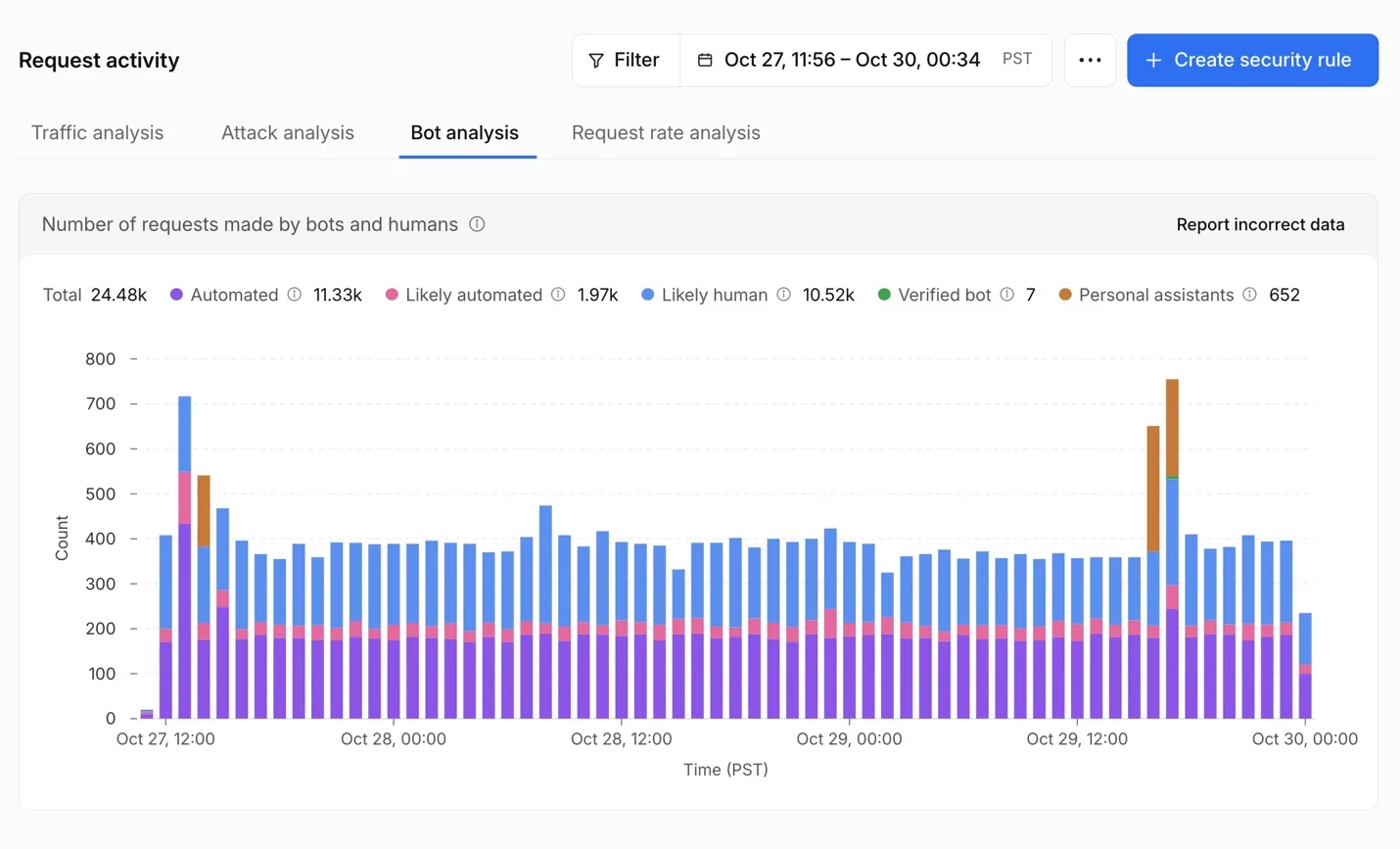
Identifying which specific agent initiates a request transforms opaque automated traffic into actionable data. Cloudflare operates what it describes as the world's largest verified bot directory, and is now integrating that intelligence into traffic reporting. Within Security Analytics, the Bot Analysis chart introduces Personal Assistants as a distinct classification, appearing alongside Verified Bot, Likely Human, Likely Automated, and Automated categories. Security personnel can isolate personal agent traffic to track its volume over time.
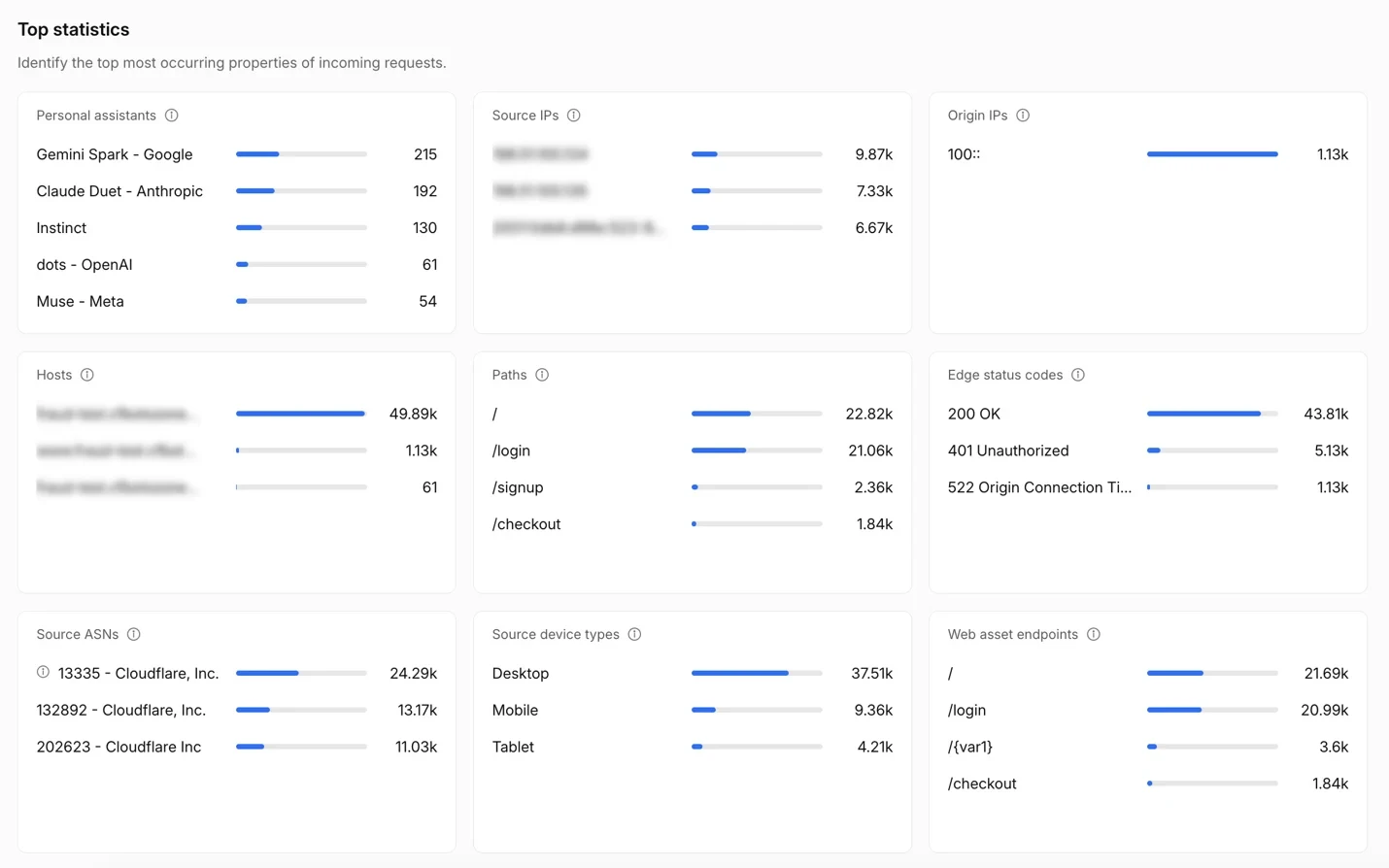
A new Personal Assistants widget in Top statistics identifies which agents are reaching a site and the volume of requests each generates. Selecting a single agent filters all other metrics to display only that agent's behavior: which paths it accesses, what HTTP status codes it encounters, and which networks originate its traffic. This granular view reveals whether an agent is authenticating to accounts, browsing product listings, accessing checkout flows, or encountering errors on incompatible pages.
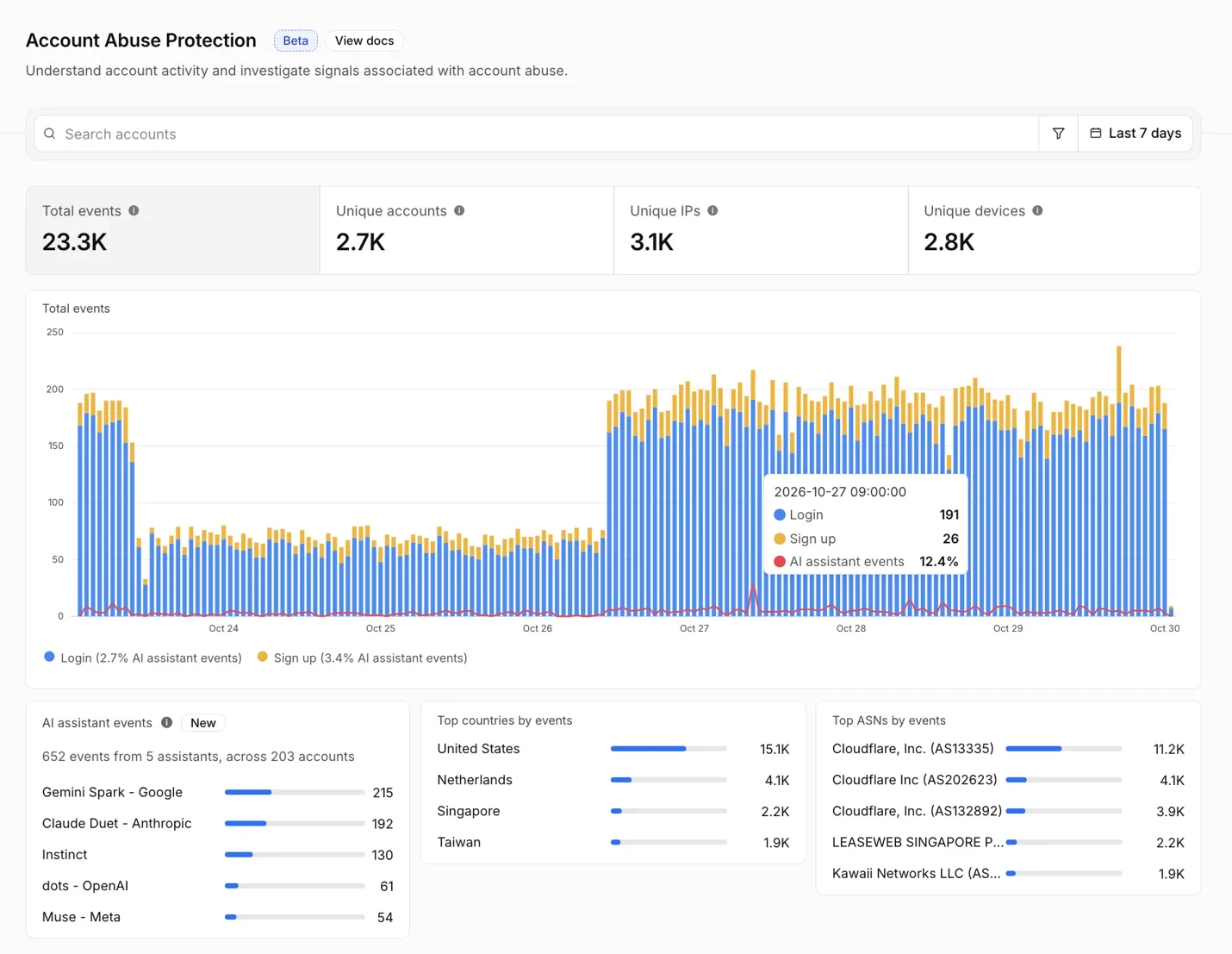
For properties using Account Abuse Protection, currently available in early access, operators and fraud prevention teams gain visibility into which user each agent represents. The population overview page displays which personal agents operate across user accounts and how many accounts employ them, helping determine whether agent activity represents a material portion of the business. Each login and registration event now indicates whether a personal agent submitted the request and identifies which one. Fraud teams can segment accounts based on AI assistant activity or the count of AI assistants in use.
Individual user account overviews now list the agents acting on that account's behalf. When a fraud analyst examines an unexpected login, they can determine whether the agent involved is one the customer has used consistently over time, or one that appeared for the first time recently and warrants scrutiny. Should evidence suggest an attacker is operating an agent against an account, fraud teams can target that specific account with a WAF rule applied to its Hashed User ID, preventing the need to block the agent across all other users who depend on it.
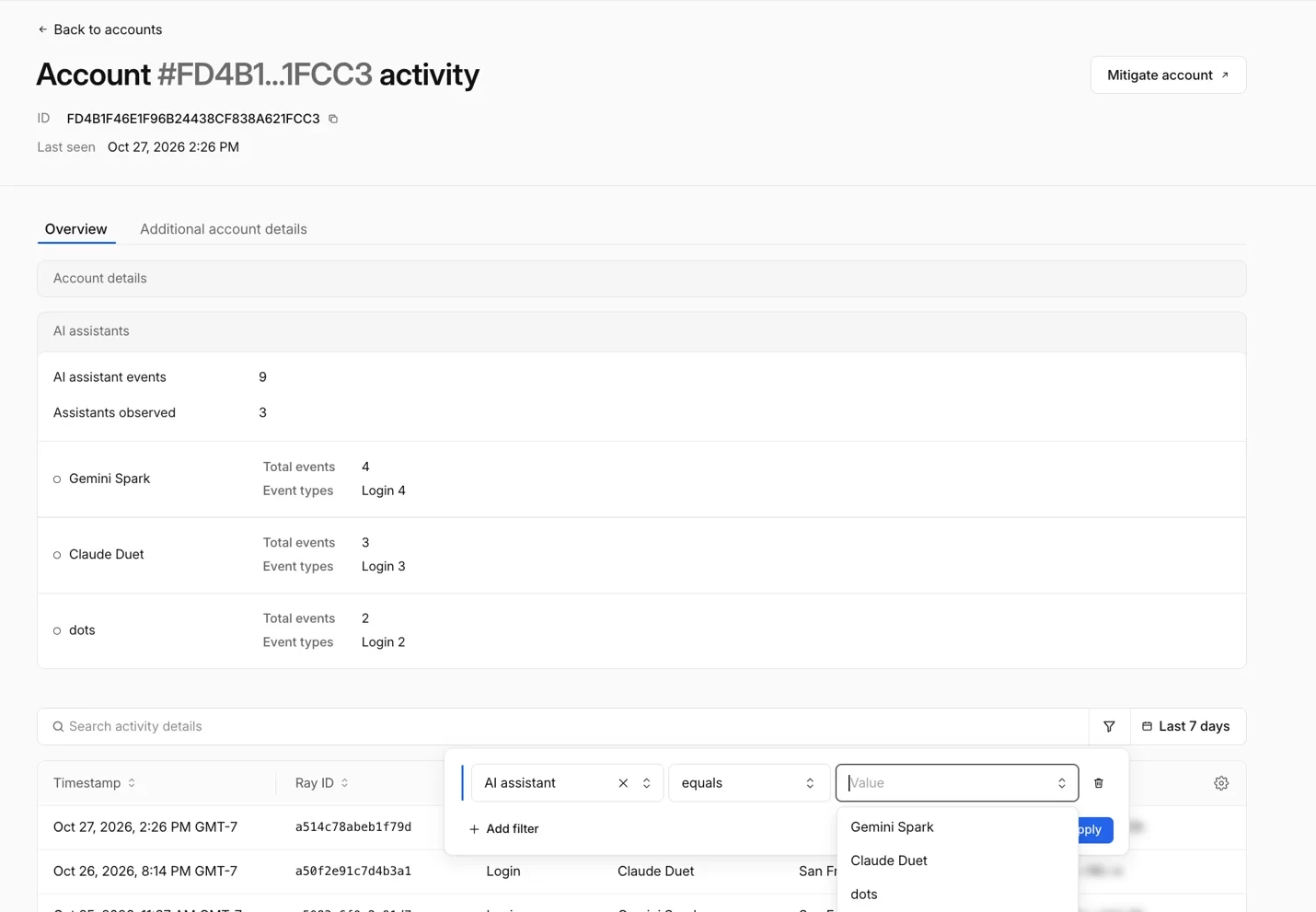
These combined views provide the foundation for making informed decisions about which personal agents to permit, restrict, or deny.
Configurable access policies for agent traffic
Cloudflare introduced AI bot policies in the summer, enabling site owners to establish separate access control rules for AI bots engaged in Search, Training, and Agent activities. The company is now extending the existing Agents policy to offer more detailed control options for supported personal agents. To reflect this expanded functionality, the feature is being renamed from AI Crawler and Agent access policies.
In Security Settings, organizations can establish a default Agents policy, then override it with a different setting for each supported personal agent: Allow (do not block), Block on pages with ads, or Block. As an example, an operator might set the overall Agents policy to Block on pages with ads while selecting Allow (do not block) for a particular supported personal agent they wish to welcome. Existing Search and Training policies remain unchanged.
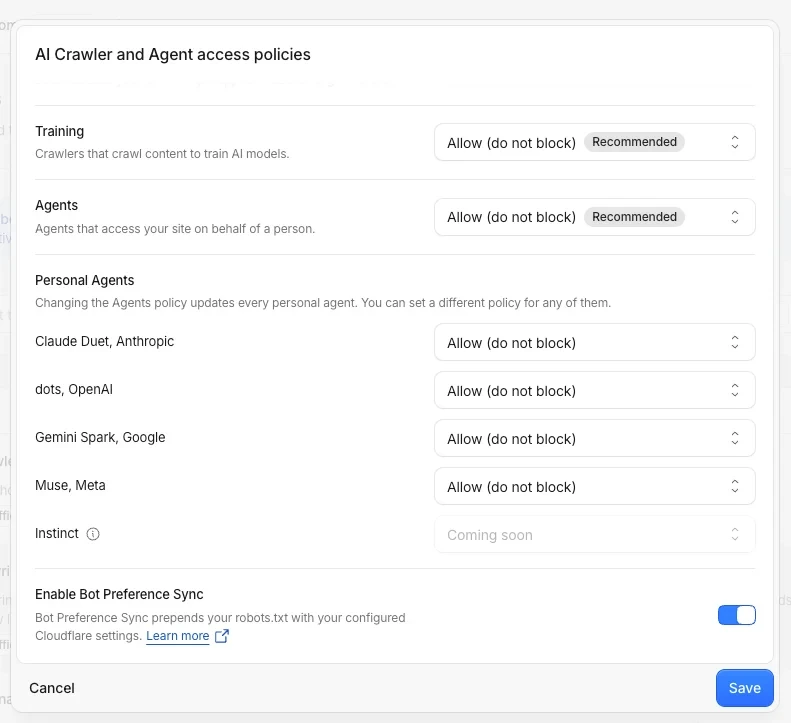
These choices are also available during the initial setup of a new zone on Cloudflare. The onboarding process asks whether a site generates revenue through advertising, then recommends policies tailored to that answer. Site owners retain the ability to modify access controls later through Security Settings.
The appropriate policy varies by site. One publisher might permit a supported personal agent across its entire domain to help readers discover articles, while another might block that same agent on ad-supported pages. Each publisher is selecting the access control that serves its business model.
Agent identity and user context
The analytics and policies released today provide site owners with visibility into personal agent activity and the ability to control access. Cloudflare's next objective is to help site owners maintain the context of their relationships with users when personal agents function as intermediaries. A site may recognize the agent submitting a request but lack information it would normally possess about the user: whether they are an existing customer, what actions they authorized the agent to perform, whether they maintain an active subscription, or which security measures should apply.
Achieving this goal will demand privacy-respecting approaches to accomplish three things: (1) transmit user context through an agent, (2) enable sites to evaluate reputation, and (3) create clear responsibility when issues arise. Cloudflare plans to share additional details as it engages with agent operators and other ecosystem participants, allowing site owners to decide whether to grant agents expanded access while preserving their ability to maintain customer relationships.
Setting your site's agent policy
The person directing a personal agent to compare products, locate support resources, or finalize a purchase remains a customer attempting to connect with a business. Site owners should examine how personal agents are accessing their properties, then navigate to Security Settings → AI Crawler and Agent access policies to establish the terms that fit their requirements.