Cloudflare has expanded its CASB offering with automatic remediation policies, a capability that lets security teams configure event-driven responses to automatically address misconfigurations the moment they surface. Rather than requiring human approval for each remediation step, teams can now set policies that revoke compromised file shares, dispatch webhooks to external systems, or both—all without intervention.
When Cloudflare introduced its cloud access security broker, the goal was to give security teams comprehensive insight into the configuration state of their SaaS applications before misconfigurations escalate into breaches. The clientless integration identifies risks including overshared files, dormant administrative credentials, and OAuth applications with excessive access permissions across the organization on an ongoing basis.
Historically, SaaS Security Posture Management tools including Cloudflare CASB have operated as passive notification systems. Most SSPM platforms highlight problems but leave remediation to administrators, who face mounting backlogs of issues to resolve. A single misconfigured file-sharing policy in a Google Workspace environment can produce thousands of findings within minutes, and even well-organized teams typically experience delays of hours or days between detection and fix—a window wide enough for sensitive data to be accessed, shared, or indexed by search engines.
Moving Beyond Reactive Detection
Cloudflare introduced manual remediation capabilities earlier this year, allowing teams to resolve misconfigurations directly through the Cloudflare dashboard without logging into separate SaaS platforms. However, this approach still required a person to review and approve each remediation action, even when dealing with identical finding types repeatedly.
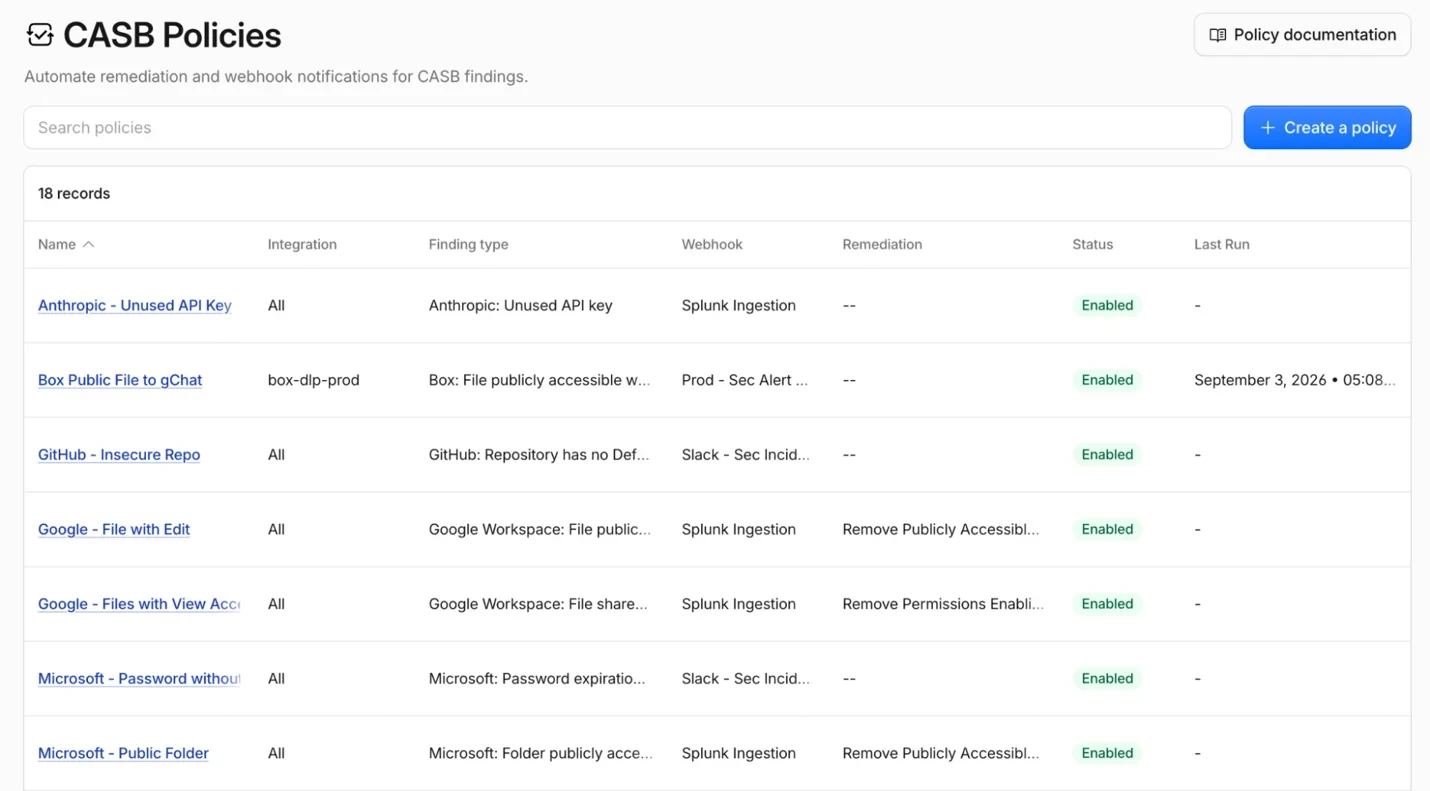
CASB policies function as an embedded automation layer within Cloudflare One that executes actions instantly upon finding detection. Security teams specify their response logic once—whether revoking access to a file share, sending an alert to a security operations center via webhook, or forwarding the event to a security orchestration, automation and response platform. The automation engine then handles all matching instances by running the configured action.
Consider a typical scenario: many organizations enforce rules preventing public file sharing but grant exceptions to marketing teams who regularly work with external collaborators. Traditional SSPMs alert administrators to any publicly shared files that violate policy, but these alerts pile up alongside hundreds of other violations, forcing staff to address each case individually. CASB policies eliminate this bottleneck. Automation activates the moment a violation is detected, revoking the public share within minutes and keeping the findings queue manageable.
How CASB Policies Function
CASB policies are automated workflows that instruct the scanning service which action to execute when a new finding appears. Once configured, a policy directs CASB to either activate a remediation action, transmit a webhook, or perform both. This design gives organizations the choice to leverage Cloudflare's native remediation tools or integrate their own internal automation and communication infrastructure—avoiding the need to operate across multiple platforms or build custom event handling systems.
Technical Architecture
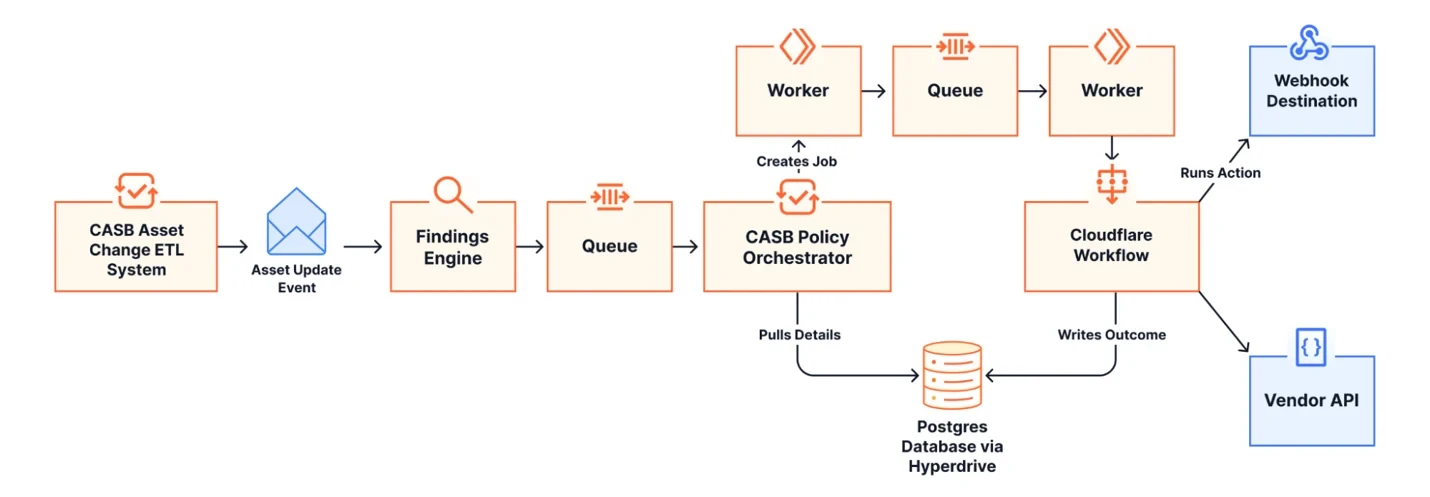
CASB policies rely on the Cloudflare developer platform, the same infrastructure available to all Cloudflare users. When the scanning engine detects a finding, it sends an orchestration message to a Cloudflare Queue. A Worker process checks whether an existing policy matches the incoming finding. If a match occurs, the Worker creates a corresponding job and passes it to the remediations pipeline, which operates on Cloudflare Workflows to ensure durable, fault-tolerant processing. This architecture means jobs persist through process restarts and retries happen automatically.
Cloudflare Workflows also manages rate limiting from third-party APIs gracefully. When a vendor returns a rate limit error, the Workflow pauses for the appropriate backoff duration and retries without losing the job. Cloudflare targets completion of remediation within five minutes or less from initial detection.
Creating and Configuring Policies
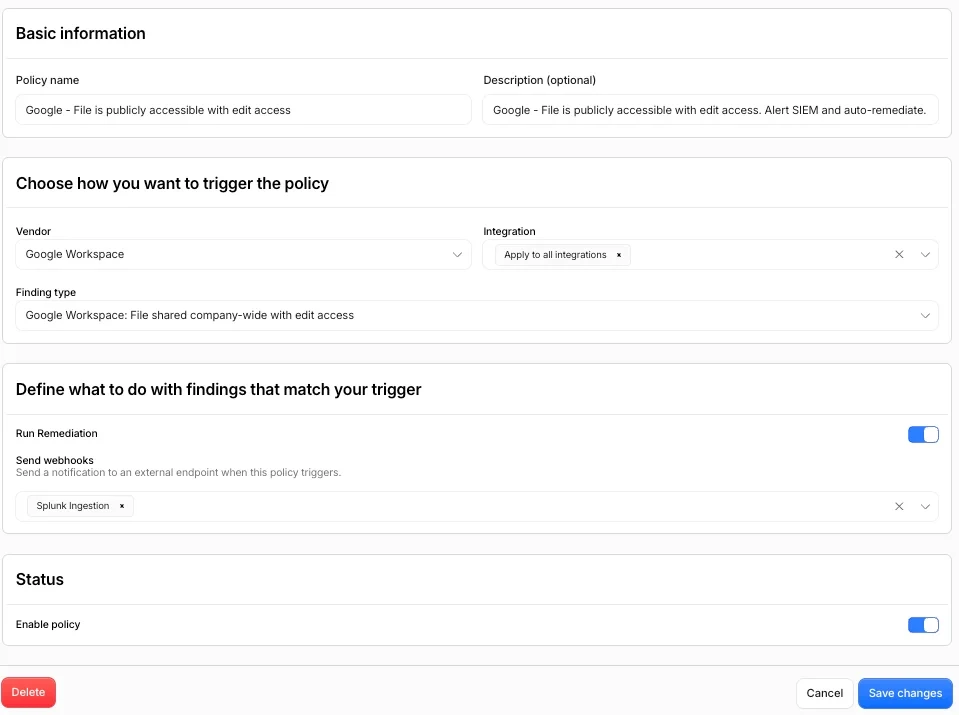
To set up a policy, administrators access the Cloudflare dashboard and follow these steps:
- Select the vendor and specify which integration or tenant the policy applies to
- Choose the integration—either specific integrations or all integrations for the selected vendor
- Identify the finding type that should activate the policy
- Select an action from the available options for that finding type
Two action categories are available:
- Run remediations: First-party actions that Cloudflare executes directly against the SaaS integration API. CASB currently supports remediation actions for Microsoft and Google Workspace file and folder findings. This may require upgrading integration permissions to read/write.
- Send webhooks: Forward finding details to webhook destinations including Slack, Microsoft Teams, Jira, ServiceNow, Tines, or any custom HTTP endpoint the team uses
Sample Webhook Payload
{
  "id": "019f1755-23d0-7097-a9b5-fb2f82edbfc9",
  "type": "casb.finding_instance.policy_dispatch",
  "metadata": {
    "actor": "",
    "time_sent": "2026-06-30T07:01:34.066Z",
    "destination": "",
    "version": 1
  },
  "data": {
    "object": "finding_instance",
    "action": "policy_dispatch",
    "finding": {
      "id": "865184c0-9e17-411a-aa5a-a54995d70cb0",
      "severity": "High",
      "dashboard_url": "...",
      "type_name": "File publicly accessible with view access"
    },
    "asset": {
      "id": "019f1754-cff8-74f8-bbe7-ed0e8b8ffb73",
      "name": "q3_financial_report_preview.xlsx",
      "vendor": "",
      "type": "File",
      "vendor_url": ""
    },
    "dlp": {
      "profiles": []
    },
    "metadata": {
      "access": "open",
      "download_count": 0,
      "download_url": "",
      "effective_access": "open",
      "effective_permission": "",
      "file_name": "q3_financial_report_preview.xlsx",
      "full_path": "All Files/q3_financial_report_preview.xlsx",
      "is_password_enabled": false,
      "owned_by_created_at": "2022-11-01T09:24:17-07:00",
      "owned_by_enterprise_name": "Cloudflare CASB",
      "owned_by_id": "21665592646",
      "owned_by_role": "admin",
      "owned_by_user_name": "Cloudflare CASB",
      "preview_count": 0,
      "size": 42
    }
  }
}
Audit Logging and Compliance
Each policy action generates two types of logs accessible through Insights in Cloudflare One.
Admin Activity logs record modifications to policy definitions, including who created, edited, or disabled a policy and when. If a policy was deactivated and a risk went unaddressed, this audit trail documents the sequence of events.
Cloud & SaaS Security policies logs capture the runtime results of policy execution. These logs include details such as which finding triggered the policy, which file was affected, whether the action succeeded or failed, and specific error messages if applicable—such as a 401 Unauthorized response or an API rate limit error from the vendor.
For compliance purposes, the execution log serves as documentation of remediation. It connects a specific finding, such as an overshared file like Q4_Financials.pdf, to a specific automated action and its timestamp.
Getting Started
CASB Policies are available now in the Cloud & SaaS findings section of the Cloudflare dashboard. Teams should connect or update their Microsoft 365 or Google Workspace integration to enable Read-Write permissions, then create their first remediation policy.
Cloudflare plans to introduce support for Custom Findings in the coming weeks. Since different organizations have distinct detection requirements, this feature will enable customers to customize or create finding logic tailored to their specific needs.
Organizations new to Cloudflare One can sign up for 50 complimentary seats to begin using CASB, or contact Cloudflare's team to discuss larger-scale deployments. Detailed setup instructions are available in the developer documentation.
Source: Cloudflare Blog