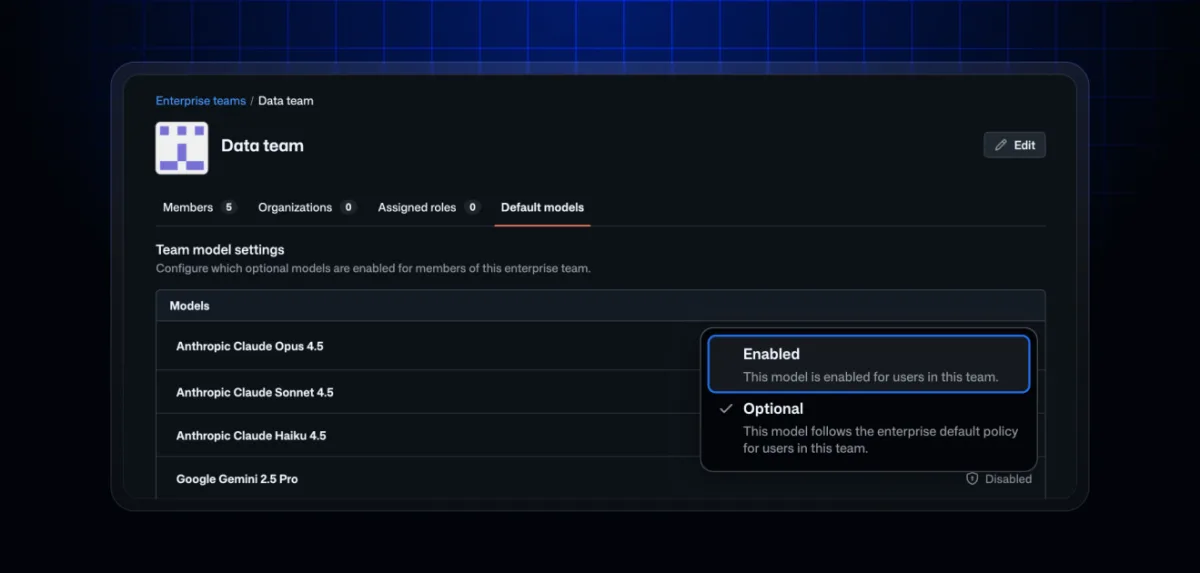
GitHub Enterprise customers holding Copilot Business or Copilot Enterprise licenses now have access to user-based model policy targeting in public preview. The capability allows AI administrators to establish a standard set of models across the enterprise while selectively granting additional models to particular enterprise teams. This approach lets admins customize access according to team function, professional role, or to support early testing initiatives by advanced teams, rather than relying solely on organization-level choices.
The preview represents an initial phase in a transition toward governance at the team level. Previously, model availability was controlled through the organization resource level, but enterprise teams introduce more granular, user-based management that aligns with actual organizational structures: by role, skill level, or department. GitHub intends to progressively expand team-level controls, delivering administrators greater precision and flexibility than organization-level policies alone.
The rollout is happening in stages, with the majority of enterprise customers receiving access to the opt-in preview starting August 3rd.
How it works
At the enterprise level, administrators can configure models into three categories:
- Enabled: Accessible to all enterprise members.
- Disabled: Not accessible to any enterprise member.
- Optional: Available for assignment to enterprise teams.
Enterprise teams model access follows a least-restrictive evaluation approach. When a user gains access to a model through any single enterprise team, that user can use the model across all contexts. To participate in the preview, activate the Enterprise teams mode toggle located in the Copilot section under "Models".
Once activated, enterprise-level and enterprise team management govern model access, and organization-level model settings cease to function. During the preview period, administrators can revert to restore their policy to its original state. Additional details are available in GitHub's documentation on managing model availability for enterprises.
Migrating to enterprise teams mode
As part of the preview, administrators can begin building enterprise teams and assigning Optional models to those teams prior to activating enterprise teams mode. This preparation phase enables you to configure model-to-user mappings comparable to those previously used with organization delegation. Before opting into the preview, examine your enterprise model policy and establish enterprise teams to distribute additional model access.
Behavior for users in multiple enterprises
For enterprises not utilizing Enterprise Managed Users, some enterprise members may hold Copilot licenses from multiple enterprises. In enterprise teams mode, only the model policies from your own enterprise apply to users when they are using a Copilot license sourced from your enterprise. Policies from other enterprises will not take effect.