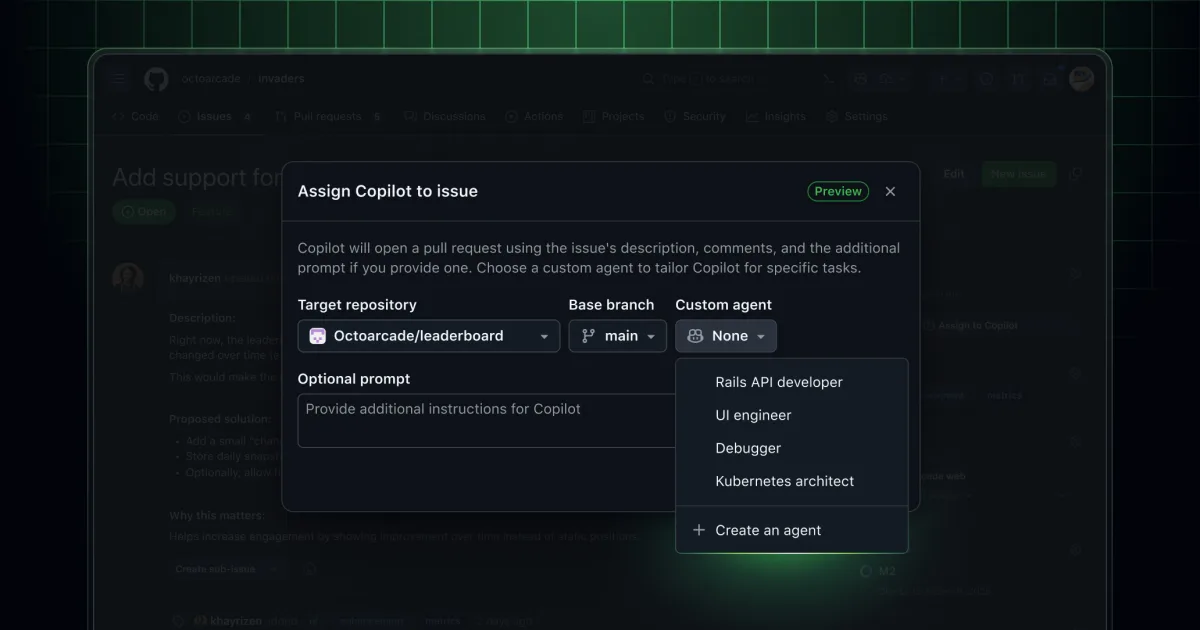
GitHub has introduced custom agents for Copilot, enabling users and organizations to adapt their Copilot coding agent (CCA) using straightforward file-based configurations. Configuration files placed in the .github/agents directory within any repository, or in the agents folder within {org}/.github or {org}/.github-private repositories, allow teams to establish agent personas reflecting their specific workflows, conventions, and requirements. These agents accept further customization through prompts, tool selections, and Model Context Protocol (MCP) servers designed for particular scenarios.
The capability extends to all GitHub Copilot users—individual developers, team members, and organizational administrators alike. Custom agents function across Copilot coding agent on github.com and the Copilot CLI, with plans to introduce the feature to an upcoming Visual Studio Code release.
Key benefits
- Establish specialized agent behaviors that function as dedicated team members, leveraging prompts and tool selections tailored to your specific workflow.
- Deploy organization-specific or team-specific agents by positioning configuration files in a standard location within your repository or organizational settings.
- Customize agent behaviors beyond standard Copilot instructions, streamlining the enforcement of coding standards, regulatory requirements, or proprietary automations.
- Grant agents access to custom tools and MCP servers, providing granular control over task execution methods.
- Begin implementation rapidly by adding a basic markdown file, eliminating the need for separate installation procedures or intricate configuration steps.
Examples
Consider a frontend engineering subagent that enforces organizational standards for React or Vue frameworks, or an agent leveraging a proprietary MCP to streamline workflows using the GitHub CLI. Custom agents enable you to codify these specifications in a single configuration file, ensuring straightforward access and simplified maintenance.
For those seeking guidance on implementation, several partners have developed custom agents available to enhance your development process. Additional sample agents and resources are accessible through @github/awesome-copilot.
Additional information is available in the documentation covering custom agents, and participation in discussions is encouraged through GitHub Community.