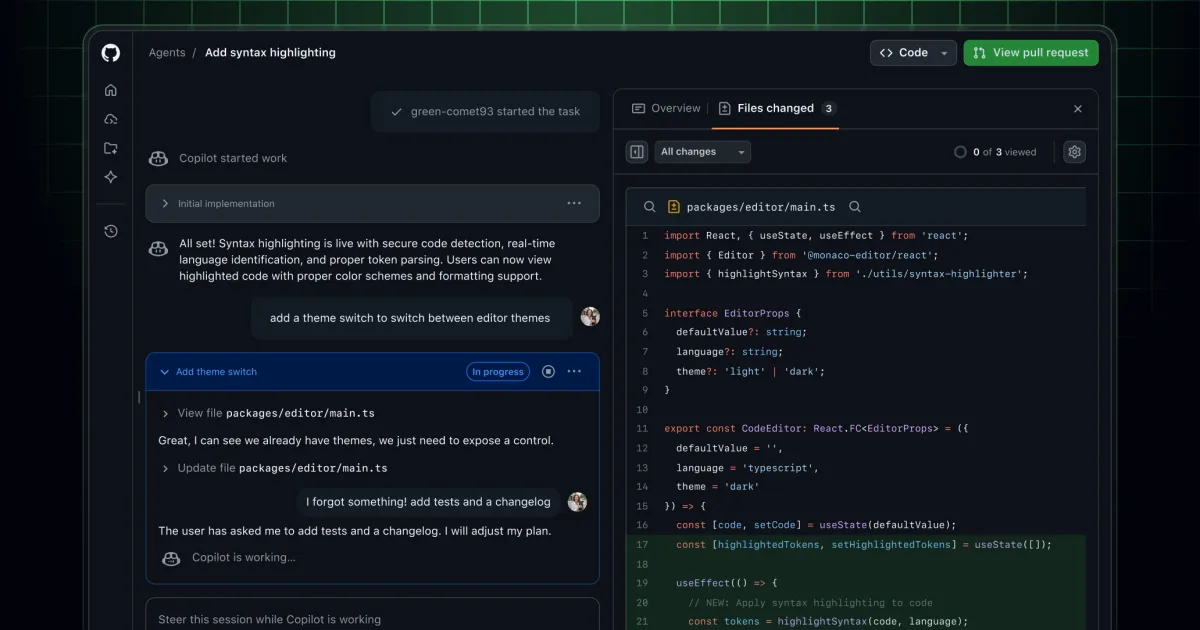
The redesigned management system for Copilot coding agent tasks on github.com brings all essential controls into a single, unified workspace. Users no longer need to switch between different pages to monitor progress, examine changes, or manage their assignments.
A consolidated view now displays Copilot's complete activity history. Session logs appear alongside the Overview and Files changed tabs, enabling developers to access all pertinent details without leaving the current page. Developers can observe the reasoning behind Copilot's commits as they are created, directly within the context of the work.
Real-time steering
Copilot's responsiveness has improved significantly through real-time steering capabilities. Users can now provide direction to Copilot while it operates actively. Input supplied during an ongoing session allows Copilot to adjust its behavior immediately after completing its current tool operation. Feedback delivery has become more straightforward, removing the requirement to navigate to pull request comments to mention @copilot. Steering can now occur through the chat input field or by adding remarks directly within the Files changed view.
Centralizing your task management
The new task view enables seamless transitions between different assignments. Users can quickly assess task status and intervene when Copilot requires guidance. Task cards include convenient shortcuts that direct users straight to the associated pull request.
More creation flexibility
Beyond the current capabilities in the agents panel and at github.com/copilot/agents, Copilot coding agent tasks can now be initiated directly on github.com, via github.com/copilot (using /task in chat), and through the GitHub Mobile agents task page. Regardless of where a task originates, users retain the ability to select a custom agent to tailor Copilot's behavior and results.
Continue where you prefer working
Sessions can be opened in Codespaces, VS Code Insiders, or the GitHub CLI, allowing developers to either build upon Copilot's contributions or assume complete control of the work.
This capability is accessible to all users with Copilot coding agent access. Collaborating with Copilot on tasks requires write permissions to the repository. To use sessions in VSCode Insiders, users must have the latest VSCode Insiders version installed along with the GitHub Copilot Chat and GitHub Pull Requests extensions.