
Safely rolling out containers at scale traditionally requires building custom systems to handle traffic distribution, metric evaluation, automated rollbacks, and approval workflows. This deployment-specific infrastructure exists purely to protect the release process itself. AWS has integrated all these capabilities into Amazon Elastic Container Service (ECS), removing the need for teams to construct their own solutions.
These features are accessible through a single API endpoint and function immediately when using the Amazon ECS deployment controller. Teams no longer need to develop custom abstractions or adopt unfamiliar frameworks to achieve desired deployment behavior. Instead, they select and configure the specific features they need through a service deployment configuration, adjusting settings as requirements evolve.
How the building blocks map to ECS
Teams familiar with progressive delivery on Kubernetes using tools like Argo Rollouts or Flagger understand the typical architecture: an installed controller requiring ongoing maintenance, metrics analysis connected to observability backends, and a traffic provider for weighted canary releases. Argo Rollouts approximates canary weights using replica counts and relies on ingress controllers, service meshes, or Gateway APIs for precise traffic percentages. Flagger uses service meshes or ingress controllers for weighted canaries and standard Kubernetes Services for blue/green deployments. Both are mature open-source projects suited for teams wanting full control and customization of each component. ECS takes a different path by embedding these same capabilities directly into the platform.
When are rolling deployments not enough?
Rolling deployments remain ECS's starting point and the appropriate choice for most use cases. During a rolling deployment, ECS gradually replaces tasks running the old version with tasks running the new version in batches. Production traffic begins flowing to new tasks as soon as they pass health checks, and ECS terminates old tasks as replacements take over. The minimumHealthyPercent and maximumPercent settings govern how many tasks can be replaced simultaneously and how much additional capacity the deployment can consume. Rolling deployments work alongside both the deployment circuit breaker and CloudWatch alarm-based automatic rollback mechanisms.
The limitation emerges in scenarios like an API service running on ECS behind an Application Load Balancer that receives a significant code refactor. When a bug appears, detection delays occur due to metric collection and alarm processing latency. By the time the alarm triggers, a substantial portion of tasks—potentially all of them—are already executing the new version and handling production traffic. Although ECS can roll back, a rolling deployment rollback requires launching new tasks, waiting for health checks, and replacing the problematic ones. This process exposes the application's availability for an extended period.
There's a limit to how fast a rolling deployment can roll back, which increases customer impact (measured by failed requests per unit of time) from the new, bad application version.
Blue/green deployments can reduce impact duration. With ECS's built-in blue/green strategy, the previous version continues running alongside the new version for a configurable observation period (up to 24 hours). Production traffic routes entirely to the new version, yet the old version's tasks remain registered and prepared to accept traffic with a single switch. If issues arise, rollback becomes a straightforward traffic shift rather than a complete redeployment.
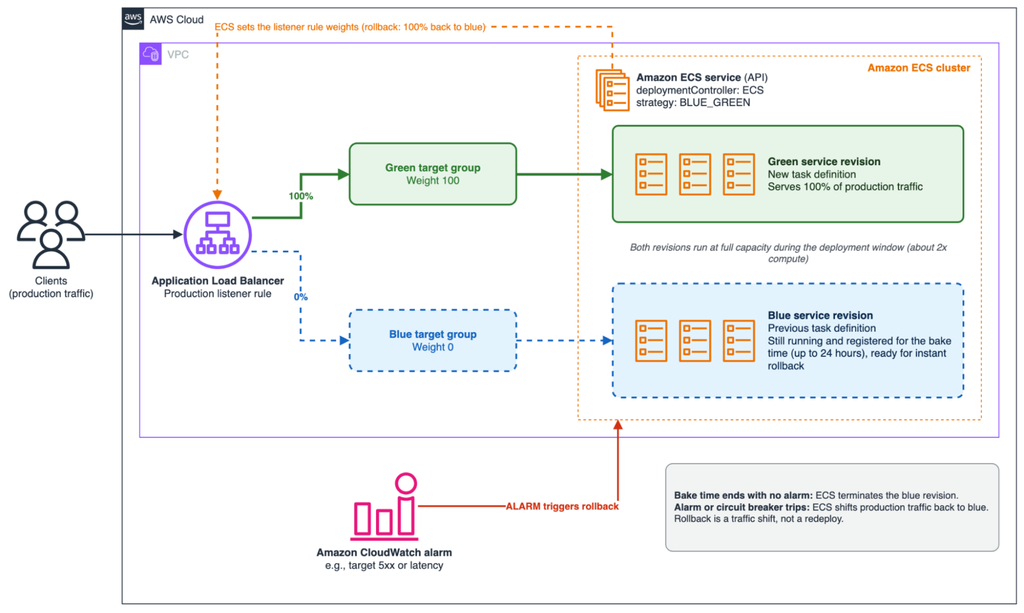
The tradeoff involves doubling compute resources during the deployment window. For services where a faulty release handling 100% of traffic for even brief periods creates significant costs, this resource expense becomes acceptable.
How does ECS know something went wrong?
Amazon ECS can detect problems and trigger traffic shifts through multiple configurable mechanisms in a service's deployment configuration:
- Task launch and health state monitoring during deployment via circuit breaker
- Amazon CloudWatch alarm monitoring and automatic rollback
- Manual rollback controls through the StopServiceDeployment API
- Service deployment lifecycle hooks using Lambda or pause target types
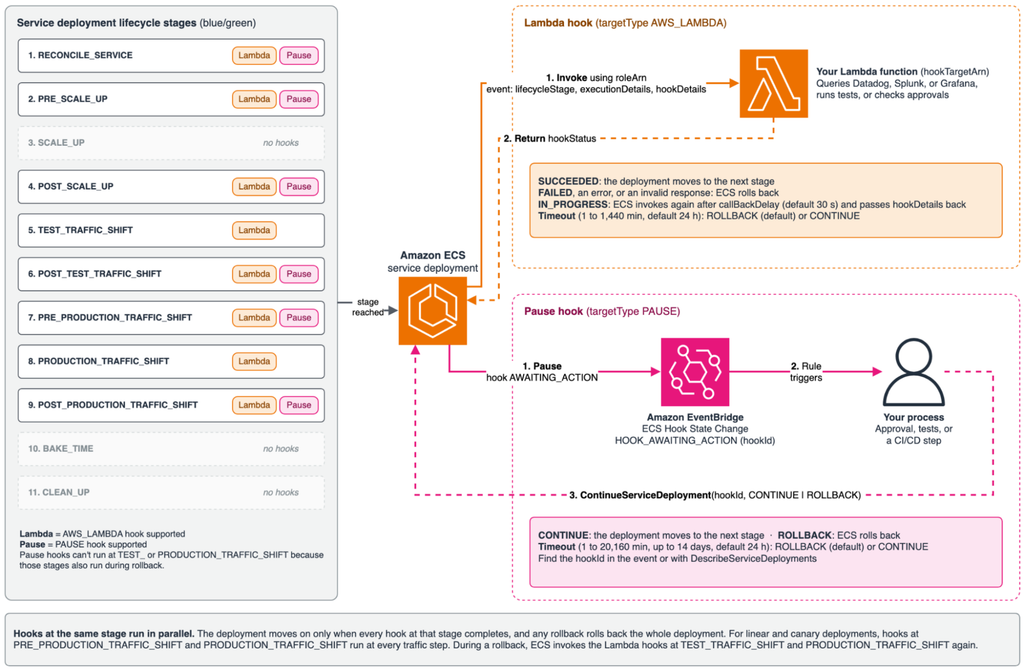
For API server issues, Amazon CloudWatch alarms can track HTTP response codes and initiate rollback when detecting elevated 4xx or 5xx error rates. However, if application monitoring exists outside CloudWatch on platforms like Datadog, Splunk, or Grafana, service deployment lifecycle hooks enable custom automation. This approach polls external data sources through a Lambda function configured with a Lambda target type. The key is configuring the lifecycle hook for the POST_PRODUCTION_TRAFFIC_SHIFT stage.
When Lambda functions aren't viable, an Amazon EventBridge trigger with a pause hook target type provides an alternative. Amazon ECS sends an EventBridge event when the service deployment reaches the configured lifecycle stage. This trigger should activate a custom process that runs the same monitoring loop to check alarms or metrics. Once the monitoring condition passes, calling the ContinueServiceDeployment API allows the deployment to proceed.
Beyond alarms and lifecycle hooks, the service deployment circuit breaker monitor prevents problematic deployments from advancing. This monitor tracks failed or unhealthy tasks during deployment and compares the total against a threshold. Configurable circuit breaker settings allow customization of the failure-counting logic to overlook intermittent task launch or health issues. The failure threshold itself can be adjusted based on application requirements.
Advanced deployment strategies
The approaches described above represent just one application of ECS's built-in features for customizing service deployments. When a single-step traffic shift doesn't match application needs, linear and canary deployments offer alternatives.
Linear and canary deployments resemble blue/green deployments in their use of defined traffic-shift stages to separate application traffic between versions. Linear deployments shift traffic in uniform increments based on configuration settings. Canary deployments differ by implementing a two-step traffic migration rather than multiple incremental shifts.
Not advanced enough? There's more!
All deployment tools discussed apply across every deployment strategy that ECS supports. Similarly, all deployment strategies work with ECS Service Connect and VPC Lattice network integrations. One limitation exists: lifecycle hooks can only be applied to two stages in rolling deployments, since rolling deployments have a simpler lifecycle than blue/green, linear, or canary approaches.
All deployment strategies also work without a load balancer, ECS Service Connect, or VPC Lattice integration! That's right, even blue/green, linear, and canary deployments.
Service deployment lifecycle hooks were designed with extensibility as a core principle, creating specific integration points for managing application traffic shifts. Custom logic can control behavior, with Amazon ECS invoking a lifecycle hook at the production traffic-shift stage. This stage requires a Lambda target, as pause hooks cannot be configured there.
Which strategy should you pick?
Regardless of which deployment strategy you select, the protective mechanisms—alarms, circuit breaker, lifecycle hooks, and rollback capabilities—come built into the service. Configure them once and dedicate engineering effort to product development rather than pipeline infrastructure.
Start with a single service, enable blue/green with a CloudWatch alarm, and evaluate the results firsthand. The Amazon ECS lifecycle hooks guide serves as the next resource when implementing custom validation logic.