
Varonis Threat Labs has disclosed a credential-stealing attack that leverages external multifactor authentication providers to harvest passwords from users during legitimate sign-in attempts. Named TrustSink, the technique targets systems that delegate MFA validation to third-party services, with researchers demonstrating the attack against Microsoft Entra.
Microsoft Entra's architecture permits organizations to integrate external MFA providers for second-factor authentication. When a user logs in with a password, Entra can route them to an external provider to complete the MFA challenge. Once the provider returns a cryptographically signed token confirming successful authentication, Entra grants access.
An attacker holding a compromised highly privileged Entra account can register a malicious External Authentication Method (EAM) to act as an external MFA provider. This rogue provider injects a convincing replica of Microsoft's password prompt into the authentication sequence, capturing credentials in plaintext before returning a valid signed token to complete the login.
Varonis documented the attack's effectiveness in their test environment: "In our test tenant, every sign-in completed normally while our server received passwords with timestamps and source IP addresses. Resetting a captured password did not remove the rogue provider. It remained in the authentication flow and captured the replacement password at the user's next sign-in."
TrustSink is not an entry-point attack. It requires the attacker to already possess control of a highly privileged Entra account before the credential-harvesting phase can begin.
How the attack unfolds
The attack exploits the trust relationship Microsoft Entra establishes with registered external MFA providers. Varonis built a proof-of-concept malicious provider that mimicked a legitimate external MFA service while displaying a counterfeit Microsoft password page to victims.
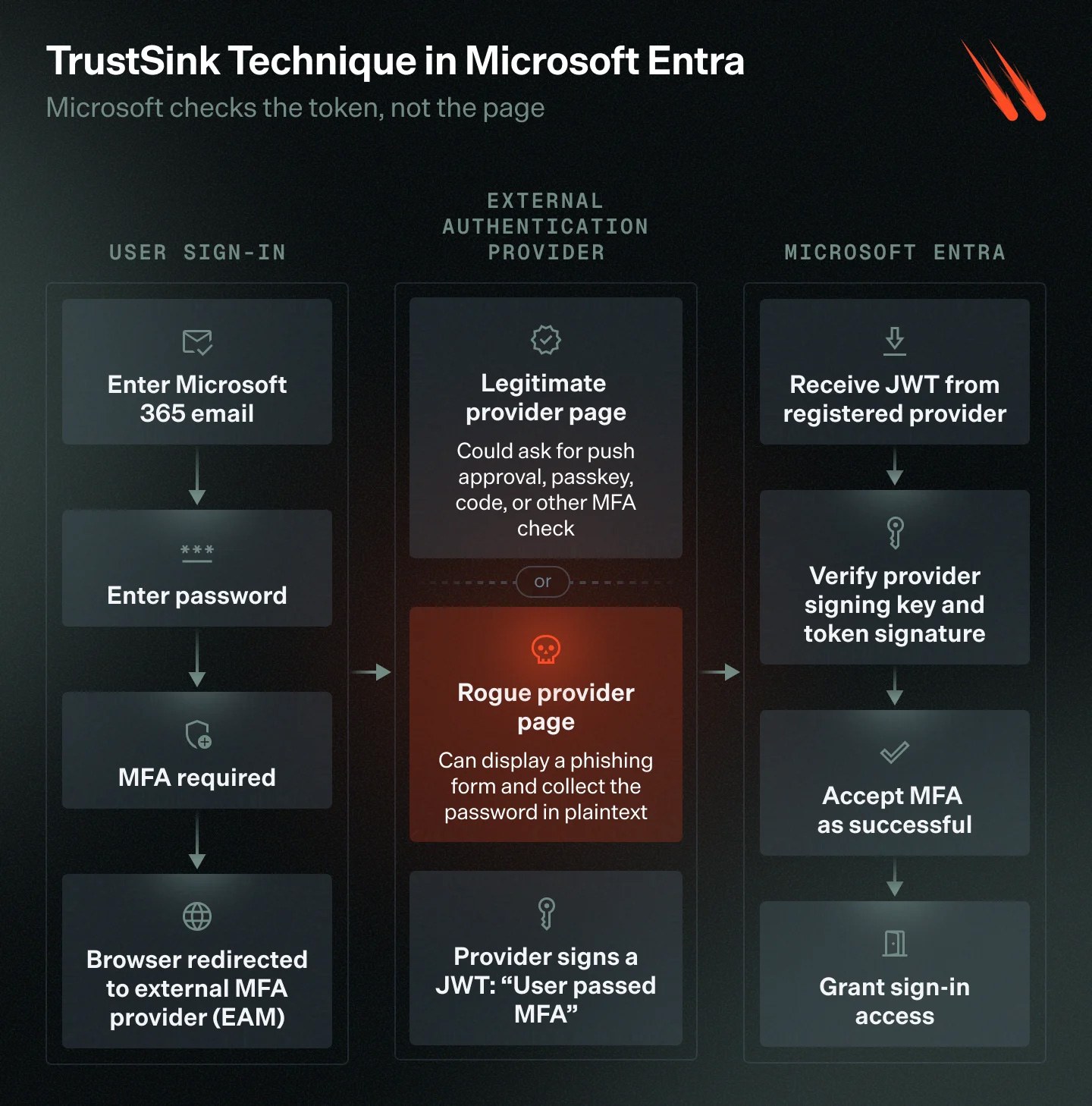
During the demonstration, the user begins by entering their email and password on the genuine login.microsoftonline.com domain. When Entra triggers MFA, the browser redirects to the attacker's external provider. Rather than presenting a legitimate second-factor prompt, the malicious provider displays a replica of Microsoft's password entry form.
If the victim re-enters their password—believing Microsoft is requesting it as part of the authentication workflow—the credentials transmit to the attacker's server. The rogue provider then generates a signed token indicating MFA completion and returns it to Entra, allowing the user to proceed to their intended application. The entire process appears seamless from the victim's perspective.
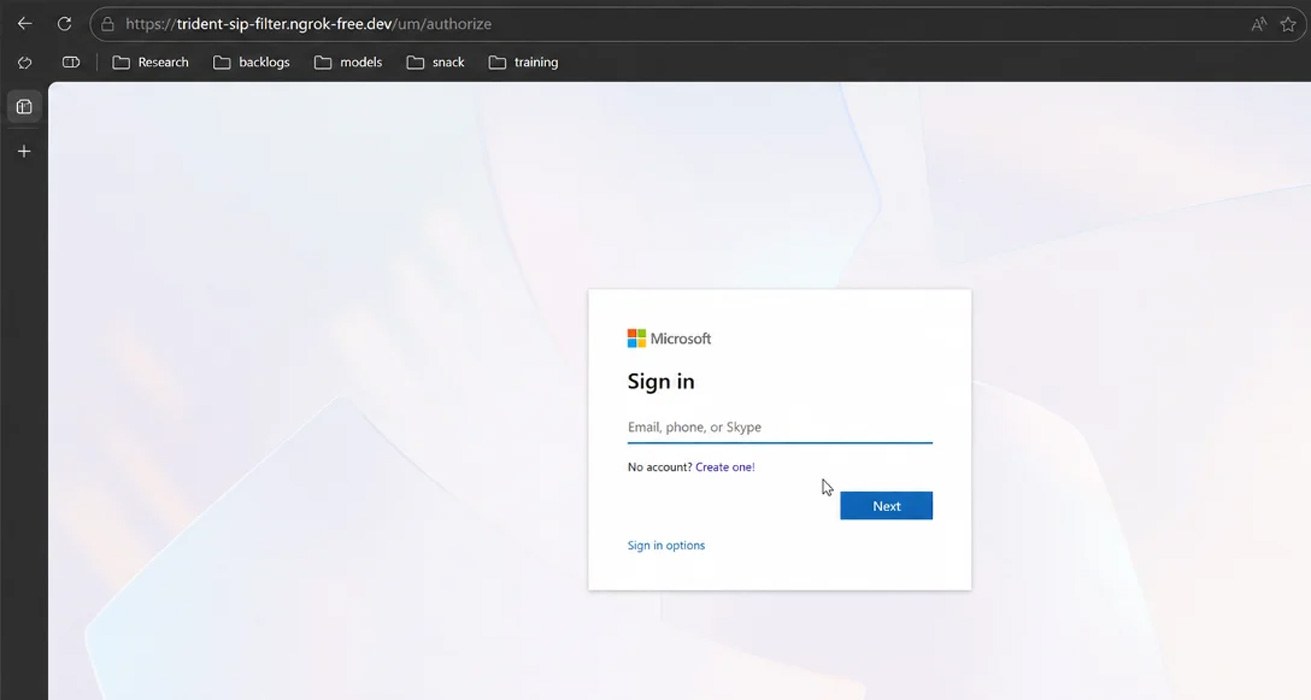
The attack succeeds because the fake password prompt appears when users already anticipate an additional authentication step. The counterfeit page replicates Microsoft's fonts, layout, and button styling, and surfaces immediately after the user has already entered their real password on Microsoft's domain.
Varonis credits prior research by security researcher Dirk-Jan Mollema, presented at x33fcon 2025 in a presentation titled "Bringing Your Own Identity in Entra ID." Mollema demonstrated how a rogue external MFA provider could satisfy MFA requirements by returning a signed JWT asserting successful authentication without performing actual verification. TrustSink adapts this same mechanism for credential theft.
Installation and persistence
Deploying the malicious external method requires modifying the Authentication Methods Policy and establishing an application, service principal, and consent grant. These operations demand either a Global Administrator or Authentication Policy Administrator role, making TrustSink a post-compromise technique that only works after an attacker has already gained high-level access.
Once installed, the rogue provider persists in the authentication chain for targeted users across multiple login sessions. Because the malicious MFA provider remains registered in the tenant's Authentication Methods Policy, password resets do not eliminate it. The provider recaptures the new password on the user's next login attempt.
Varonis emphasizes that administrators must remove the malicious provider before rotating any affected user credentials.
Recommended defenses
- Remove suspicious external MFA providers and their associated applications, keys, and redirect URIs before resetting affected users' passwords
- Monitor changes to the Authentication Methods Policy for unauthorized modifications
- Restrict standing Global Administrator and Authentication Policy Administrator privileges
- Deploy phishing-resistant authentication methods such as FIDO2 or Windows Hello for Business