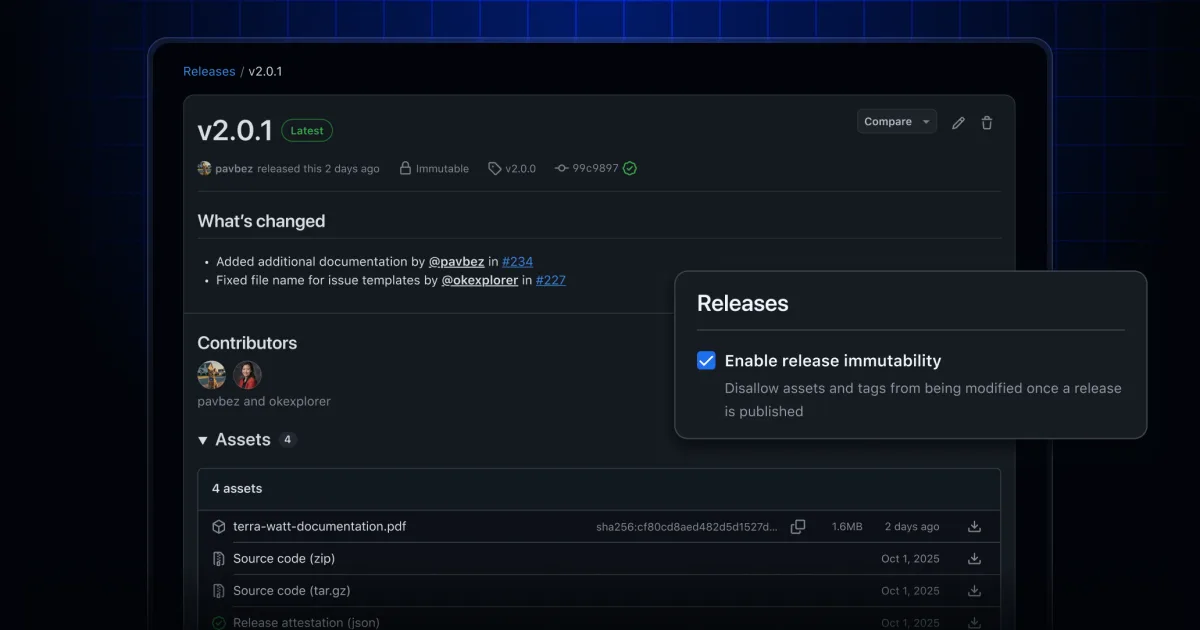
GitHub's latest release feature adds immutability protections to published software, safeguarding both assets and version tags from post-publication tampering. The capability ensures that distributed code remains authentic and unaltered throughout its lifecycle, bolstering confidence for both publishers and consumers.
Understanding immutable releases
- Immutable assets: Publishing a release with immutability locks its assets permanently—they cannot be added, modified, or deleted afterward. This protection guards against supply chain compromise attempts.
- Tag protection: Tags associated with immutable releases gain protection that prevents deletion or relocation.
- Release attestations: Immutable releases come with cryptographically signed attestations, enabling verification of asset authenticity and integrity both within GitHub and in external systems.
Activating immutable releases
Immutability can be configured through repository or organization-level settings. Upon activation:
- All subsequently created releases automatically become immutable, with locked assets and protected tags.
- Previously published releases retain their original mutable status unless explicitly republished.
Turning off immutability does not retroactively affect releases that were created while the feature was active—those remain permanently immutable.
Attestations and verification workflows
Attestations enable confirmation that artifacts have not been tampered with, independent of GitHub's platform. Built on the Sigstore bundle format, attestations integrate seamlessly with the GitHub CLI and work with any Sigstore-compatible system, allowing teams to embed integrity checks directly into CI/CD automation. Additional guidance on verifying release integrity is available in the official documentation.
The GitHub Community forum welcomes user feedback and questions about the new immutable releases capability. Comprehensive details are available in the immutable releases documentation.