Cloudflare Stream serves as a robust video delivery platform for many organizations, but certain use cases demand more specialized capabilities. Scenarios such as rendering live annotations during a broadcast or embedding subtitles directly into video files require building a dedicated video processing system.
Cloudflare has introduced Streamline, a new developer playground that illustrates how to construct a system for delivering customized video experiences on Cloudflare's Developer Platform. The platform demonstrates how Streamline integrates Workers, Containers, and various media protocols to transform video content and immediately distribute the output as either a livestream or stored video. Developers can experiment with Streamline for their own projects.
Video processing pipelines require a persistent, long-running execution environment capable of running specialized compiled code with guaranteed memory and CPU resources. Since video streams may operate for extended periods, the media processor must maintain an independent lifecycle separate from the initial request. An application needs to be able to initiate a pipeline, supply its input, monitor it, and terminate it without maintaining an open request connection throughout the entire duration.
Cloudflare offers the necessary building blocks for this architecture. Containers provide long-lived runtimes suited for media processing. Durable Objects manage orchestration. Workers handle control signaling and monitoring.
For Streamline, the team constructed a media engine running in a Container to perform real-time media processing. A Worker controls the Container and exposes control, preview, and testing capabilities to an agent or user. The pipeline continues operating even if the Worker disconnects. Streamline's architecture uses modular components, allowing the media engine to be swapped with dedicated encoding services in the future.
Architecture
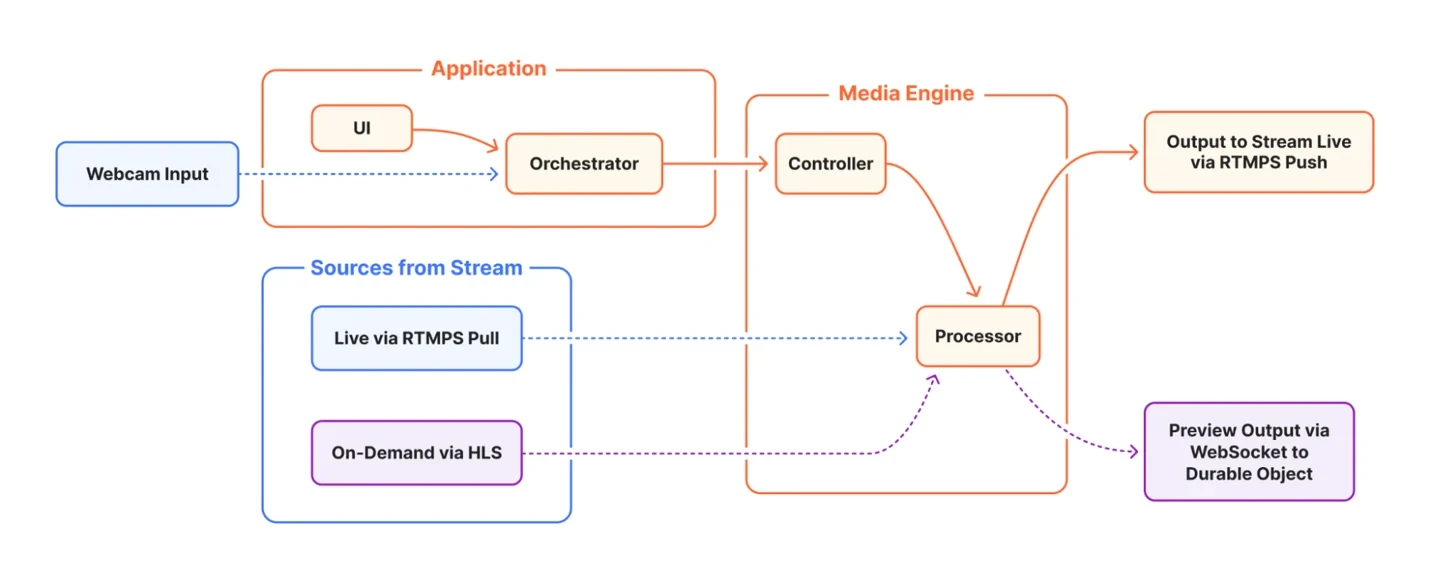
A Streamline deployment comprises two primary components: the Media Engine, which manages media input, output, and processing operations, and a controlling Application, which creates, configures, observes, and terminates media sessions.
- Controller: A control harness written in Go that runs an HTTP server, receives incoming requests, and translates them into operations executable by the media engine.
- Processor: Performs the actual media processing. The current implementation uses FFmpeg, though this is an internal implementation detail rather than part of the user-facing API.
The Media Engine runs in a Container and handles all media input, output, and processing. It can pull RTMPS playback from one Stream Live input and publish RTMPS output to another Stream Live input. It can retrieve a Cloudflare Stream HLS manifest and its segments to use hosted videos as input. It can accept video input from a source supplied by the controlling application, such as a webcam. It can publish preview video over an outbound WebSocket to a Durable Object relay. Applications needing preview can connect to that relay through their own WebSocket.
Application
The application is built using Workers and can be a full-stack browser application, an agent, or an embedded system. It includes:
- User interface (UI) including client logic, identity and access policy. This example uses a browser application, so it also includes a browser interface.
- Orchestrator coordinates the session, the Container lifecycle, and preview relay. A Durable Object implements the orchestrator.
During development, the system can run locally, where the container is simply a local Docker instance and the Durable Object is not used: there is a single user, the controlling application does not require authorization for local access, and the video preview can connect directly to a WebSocket on localhost.
When deployed to Cloudflare, an authorized user or agent can access the Worker to initiate a new session. This launches a new Streamline container if necessary, manages its lifecycle automatically, exposes an API to perform various video manipulation operations, and routes inputs from and outputs back to Cloudflare Stream.
Container lifecycle and session management
The controlling Worker application starts a long-running media processing session. After initiating the session, the application can safely disconnect and reconnect while the Container continues processing until the controlling application stops it. A maximum duration is included to ensure a session eventually closes and cannot run indefinitely without external control. While a media processing session is active, the container instance is unavailable for other applications.
A Cloudflare Container automatically enters sleep mode if it has not received incoming requests for a defined interval. However, once the pipeline is running, it must continue even if the controlling application disconnects and receives no requests. This behavior can be implemented by overriding the onActivityExpired() callback on the container. If the expiry time has not been reached, the activity is renewed; otherwise, the container is destroyed.
async onActivityExpired() {
  await this.withControlLock(async () => {
    const session = await this.getRelaySessionLocked()

    if (session?.expiresAt) {
      this.renewActivityTimeout()
      return
    }

    await this.destroy()
  })
}
API
The HTTP server implemented by the Go harness and the Durable Object associated with the Container together define the low-level interface to the system. To provide an abstraction over this, the system remains as agnostic as possible to who or what is controlling the session and any unnecessary backend implementation details.
Streamline exports two packages:
@cloudflare/streamline/clientDefines a high-level, session-based API.@cloudflare/streamline/Exposes the Durable Object base class associated with the container. This routes the API requests, implements the preview relay server, and provides hooks for security and access policy.
In a remote deployment, the controlling Worker is expected to import @streamline/cloudflare and define a concrete subclass of the Durable Object exposed by the container for application-specific logic and storage.
In local mode, where there is no Durable Object, the frontend defines a thin adapter layer that maintains the session-based API but connects directly to the local Docker instance with no access controls.
The example below shows how the controlling application can use the API to access Streamline, prepare a session, and start a video processing pipeline.
const streamline = createStreamline({ baseUrl: 'https://media.example' })
const session = await streamline.sessions.create()
const result = await session.start(config)

// At this point the pipeline is running, unless failure occurred.
console.log(result)
config is a JSON object that defines the processing pipeline to be executed.
- Creates a new Streamline instance.
- Creates a new processing session.
- Reconnects to an existing session.
- Starts a new processing pipeline.
- Sends a chunk of video data in "webcam" mode.
- Updates the transparent annotation overlay.
- Receives metrics about the current session.
- Stops the processing in the current session.
Defining and running a video processing pipeline
session.start() constructs and runs a processing pipeline. It takes a single argument: a JSON configuration object defining the processing to be performed:
- Input(s)
- Operations
- Output
The example below starts a pipeline that takes an RTMP (real-time messaging protocol) broadcast as input (such as a feed from a Stream Live input receiving an inbound livestream), applies an overlay image with transparency, and sends the output to an RTMP destination (such as another Stream Live input for recording or broadcast). This allows the Worker application to create a modified version of a livestream in real time.
const session = await streamline.sessions.create()

const result = await session.start({
  input: { type: 'rtmp', profile: 'primary-input' },
  pipeline: [
    {
      op: 'overlay',
      params: { image: '/app/assets/cf-logo.png', position: 'top-right' },
    },
    {
      op: 'encode',
      params: {
        codec: 'h264',
        preset: 'fast',
        bitrate: '1500k',
        resolution: '1280x720',
        fps: 30,
      },
    },
  ],
  output: { mode: 'rtmp', profile: 'primary-output' },
})
Video-on-demand input via HLS
Streamline can also ingest streaming video input via HLS (HTTP live streaming), for example a video hosted on Cloudflare Stream. The example below shows how a Worker application could run a pipeline that ingests a Stream video, reads the embedded closed caption subtitles and renders them as text on the video, and sends the output via RTMP, such as to a Stream Live Input for broadcasting or recording of the modified version.
const streamVideoId = 'your-cloudflare-stream-video-id'
const session = await streamline.sessions.create()

await session.start({
  input: {
    type: 'hls',
    url: `https://videodelivery.net/${streamVideoId}/manifest/video.m3u8`,
  },
  pipeline: [
    { op: 'subtitle', params: { source: 'auto' } },
    {
      op: 'encode',
      params: {
        codec: 'h264',
        preset: 'fast',
        bitrate: '1500k',
        resolution: '1280x720',
        fps: 30,
      },
    },
  ],
  output: { mode: 'rtmp', profile: 'default' },
})
Sending video to Streamline
It is often useful to quickly preview a processing pipeline by sending video data directly to Streamline, for example from a webcam. An agent or embedded device application may also want to use this capability, such as sending footage from factory cameras for AI analysis or combining multiple camera feeds into a composite view.
The example below creates a pipeline that expects input from the Worker application and produces a preview video output available over a WebSocket. It applies two filters and an "annotation," which is an overlay specified as a PNG image that can be updated while the processing is running, for example to implement an animated graphic.
const session = await streamline.sessions.create()
const sessionId = session.id
if (!sessionId) throw new Error('Session creation returned no session ID')

const viewer = await openViewer('https://media.example', sessionId)

await session.start({
  input: { type: 'webcam' },
  pipeline: [
    { op: 'filter', params: { preset: 'brightness', amount: 0.1 } },
    { op: 'filter', params: { preset: 'flip' } },
    { op: 'overlay', params: { image: 'annotation', position: 'full' } },
    {
      op: 'encode',
      params: {
        codec: 'h264',
        preset: 'veryfast',
        bitrate: '1500k',
        resolution: '1280x720',
        fps: 30,
        gop: 60,
      },
    },
  ],
  output: { mode: 'websocket', format: 'fmp4' },
})
The code snippet above only starts the pipeline. The controlling Worker is not sending any media to Streamline yet.
The Worker application sends video data to Streamline using the session.ingest() call. The example below shows how a web browser application might receive chunks from the webcam and forward them to Streamline.
const stream = await navigator.mediaDevices.getUserMedia({ video: true, audio: true })
const recorder = new MediaRecorder(stream, { mimeType: 'video/webm;codecs=vp8,opus' })
let uploadTail = Promise.resolve()

recorder.addEventListener('dataavailable', (event) => {
  if (event.data.size === 0) return
  uploadTail = uploadTail
    .then(() => session.ingest(event.data))
    .catch((error) => reportUploadFailure(error))
})

recorder.start(250)
Animated overlay
The annotation overlay can be updated using the session.annotation() call. The example below shows how the Worker application could snapshot a canvas and send it to Streamline. This could be done on an animation loop, although the update rate may be limited in practice by the size of the PNG overlay images, the available bandwidth, and processing power.
function canvasPng(canvas: HTMLCanvasElement): Promise {
  return new Promise((resolve, reject) => {
    canvas.toBlob((blob) => {
      if (blob) resolve(blob)
      else reject(new Error('Canvas could not produce a PNG'))
    }, 'image/png')
  })
}

const png = await canvasPng(overlayCanvas)
await session.annotation(png)
Receiving preview video from Streamline
Streamline can also produce preview video output by specifying output: { mode: 'websocket' }.
Streamline uses WebSockets for low-latency preview video delivery back to the controlling application: the container publishes fMP4 fragments to the Durable Object, which forwards them to an output relay available over a WebSocket on the URL /relay/view, relative to the application origin. The application must connect a WebSocket to this URL and will then receive video data pushed to it as it becomes available from Streamline. The code snippet below shows how a web browser application might display the preview video feed.
function openViewer(origin: string, sessionId: string): Promise {
  const url = new URL('/relay/view', origin)
  url.protocol = url.protocol === 'https:' ? 'wss:' : 'ws:'
  url.searchParams.set('session_id', sessionId)

  return new Promise((resolve, reject) => {
    const socket = new WebSocket(url)
    socket.binaryType = 'arraybuffer'
    socket.addEventListener('open', () => resolve(socket), { once: true })
    socket.addEventListener('error', () => reject(new Error('Preview relay failed')), { once: true })
  })
}

const sessionId = session.id
if (!sessionId) throw new Error('Session creation returned no session ID')

// Connect before session.start(), or the relay rejects the publisher.
const viewer = await openViewer('https://media.example', sessionId)

viewer.addEventListener('message', (event) => {
  if (typeof event.data === 'string') {
    if (event.data === '{"type":"eos"}') mediaSource.endOfStream()
    return
  }
  sourceBuffer.appendBuffer(new Uint8Array(event.data as ArrayBuffer))
})
A production MediaSource player must queue fragments while SourceBuffer.updating is true. In local development, the browser or other controlling application simply opens a WebSocket connection directly on the local container.
Currently supported operations
In the configuration object passed to session.start(), pipeline is an array of operations from the set supported by the underlying media engine. The operation order is currently fixed by the engine; the order specified in the array is not significant. The list of currently supported operations and the order in which they are applied is below.
- Applies filtering operations, such as blur or saturation.
- Overlays an image referenced by URL or a binary PNG specified separately in a call to
annotation(). - Burns in subtitles.
- Specifies output encoding parameters.
Security
At Cloudflare, security is part of the design rather than an addition at the end. The system must ensure that only authorized users can create a new session or take control of an existing one, and that sessions are isolated from each other. Stream RTMPS input and output keys must be treated as secrets that should not be leaked to the controlling application. Resource use must be bounded.
The owner deployment is kept private using Workers' Access integration. The configured owner identity and other allowed users can edit the same shared profiles and start a session while the singleton is idle. The Worker verifies the Access session before accepting control requests and binds the active session to the verified principal. Only one session can run at a time, and a different principal cannot stop or replace the active session.
Stream Live Input keys are stored in Worker secrets or as write-only shared overrides in Durable Object storage. They are never returned by the settings API or placed in browser storage. The controlling application specifies RTMPS input and output by referring to a named profile. The Worker resolves the profile before contacting the container.
The preview video stream has two credentials with separate purposes. A Cloudflare Access service token authenticates the container workload to the publisher endpoint. A random per-session capability authorizes publishing only for the currently active relay. The service token is injected by the container's outbound Worker and never enters container memory. The initial deployment uses a temporary path-specific Access Bypass while the per-session capability remains enforced; after deployment and a successful smoke test, the rollout replaces Bypass with Service Auth.
The owner deployment is intentionally private and singleton-routed. It is not the security model for a public multi-user service.
Playground and open source
Cloudflare is releasing Streamline as open source and deploying a public playground so developers can try it out and start building.
The Streamline container can be run locally or deployed on your account. It exports the Worker API for your control application to use.
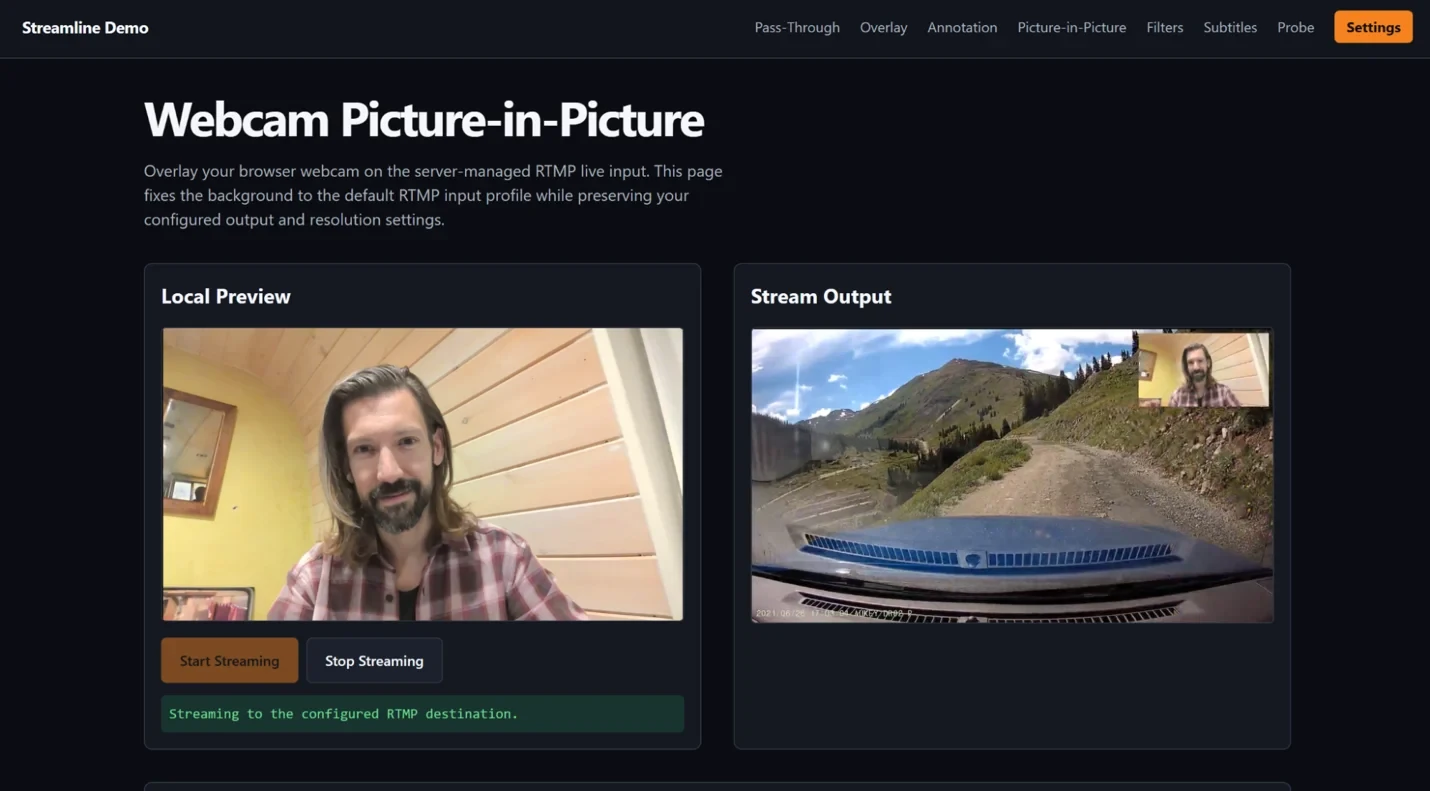
An example Worker application with an Astro web frontend demonstrates Streamline functionality with several common use cases, including overlays, subtitle decoding, filters and picture-in-picture. Probe functionality provides performance metrics and system tracing, and can be useful for debugging the system when developing new features. The example application can be run on a local Astro server or is set up to be deployed behind Cloudflare Access, so you can control who has access to your Streamline instance.
Both repositories are available as open source on Cloudflare's GitHub:
- https://github.com/cloudflare/streamline - Media engine, and package exports for applications.
- https://github.com/cloudflare/streamline-demo - Example application Worker, Astro frontend, deployment profiles, and Access tooling.
Cloudflare has published a public playground deployment of the example application. This is also something a user can deploy if desired. It uses its own Access configuration, one container identity per verified user, one active session per user, global admission control, concurrency, media and session limits, and no ability for one user to replace another user's session.
Where we go from here
Streamline demonstrates one way to combine existing managed services, like Stream, with lower-level primitives to build highly customizable media pipelines. In this iteration, Streamline uses Container CPU for media processing, which introduces a bottleneck at higher qualities or frame-rates.
Moving forward, Cloudflare is excited to see how it and the developer community can extend this architecture to build new support for computer vision pipelines, hardware-accelerated media processing, realtime experiences with next generation protocols like WebRTC and MoQ, and ultimately video encoding and decoding primitives natively in Workers.
Developers are invited to check out the hosted demo of Streamline to see how powerful these tools can be. From there, they can check out the codebases Cloudflare has open sourced to see how easy it is to deploy Streamline into their own account and use it to create their own experiences.