
Microsoft is continuing to probe a persistent problem where Copilot and Copilot Chat controls disappear from Classic Outlook on Windows machines for a subset of users.
The issue targets only those holding either a Copilot Chat (Basic) license or a paid M365 Copilot (Premium) subscription. These users may find the Copilot buttons no longer visible in the side navigation area or positioned above the ribbon. Microsoft first acknowledged the problem when it announced a service change remedy in June.
Microsoft has documented several manifestations of this problem for impacted users:
- Copilot button absent from the upper-right section above the ribbon
- Copilot icon not appearing in the left app bar or More Apps section within classic Outlook
- Copilot showing as available in Add Apps, but the Open action produces no result
- Ribbon customization allowing Copilot to display as unavailable or disabled
- Copilot remaining functional through alternate access points including Outlook on the web, the Microsoft 365 Copilot standalone app, or web interface
In a recent statement, Microsoft confirmed the issue emerges following upgrades of classic Outlook for Windows to build 20026.20182 or later versions.
The Outlook Team is actively investigating this issue. Current analysis indicates that, in affected environments, Outlook is unable to locate the MAPI property PR_PROFILE_USER_SMTP_EMAIL_ADDRESS_W within the null profile section.
Microsoft
As a result, the Outlook Copilot component cannot persist in Copilot-related settings, which may prevent the Copilot entry point from appearing in the Outlook navigation pane.
Microsoft
While developing a lasting solution, Microsoft has released a temporary workaround. Users need to activate the "Show Apps in Outlook" option through classic Outlook settings. Navigate to the File tab, select Options, proceed to Advanced, and enable the checkbox labeled "Show Apps in Outlook" under "Outlook panes."
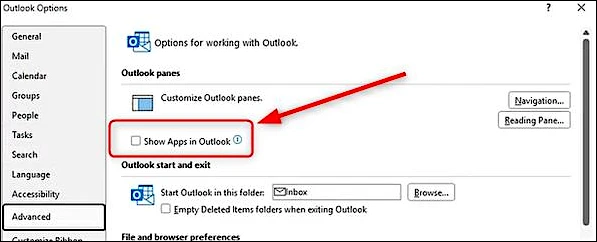
Impacted users have additional options: establishing a fresh Outlook profile, switching to the new Outlook email client, or accessing Outlook Web Access (OWA), none of which exhibit this defect.
Separately, Microsoft has identified another bug triggering unexpected Classic Outlook crashes on machines with Kaspersky Antivirus installed. The crashes generate "Event 1000" entries in the Application log connected to the Kaspersky Mail Checker component (mcou.dll). The Outlook Team continues investigating, but has directed Kaspersky users experiencing crashes to reach out to Kaspersky support.
Earlier in the year, Microsoft resolved separate known issues: one that made the Classic Outlook client inoperable when the Microsoft Teams Meeting Add-in was turned on, and another that blocked certain Classic Outlook users from sending messages through Outlook.com.