
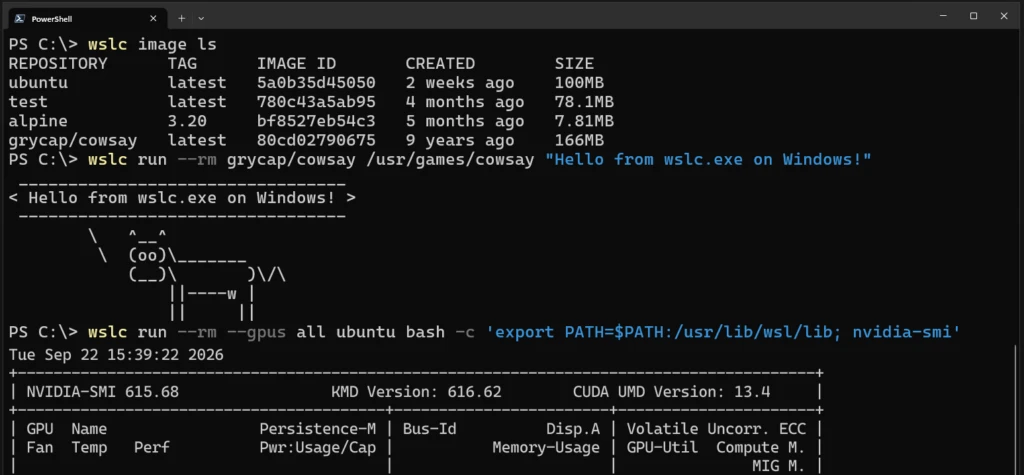
Microsoft has expanded the Windows Subsystem for Linux beyond distribution support by making WSL Containers generally available. The feature can be accessed by running wsl --update, which installs a new wslc.exe command-line tool. An alias, container.exe, is also provided to support conventional container commands.
According to Microsoft, "WSL containers CLI: wslc.exe to directly build, run and deploy Linux containers on Windows, or use its built-in alias container.exe to run the same familiar container commands."
Beyond the command-line interface, WSL Containers includes an API that enables Windows applications to launch and manage Linux containers programmatically. Microsoft stated that this "Access functions to run Linux containers programmatically in your native Windows apps – unlocking scenarios like running local AI workloads or using cloud-based containerized applications locally."
The general availability release incorporates capabilities that were unavailable during the preview phase. These additions include:
- Container restart functionality
- File transfer in and out of containers
- Health checks
- Network connection and disconnection operations
- Real-time event monitoring for containers
- Mount support
- Configurable storage location options
Enterprise integration and security controls
WSL Containers now works with Microsoft Defender for Endpoint, giving security teams visibility into process, file, and network activity within containers and their relationship to the Windows host system.
Microsoft Intune provides administrative controls to either disable WSL Containers entirely or limit developers to images from approved registries. Microsoft explained that "With container registry allow lists, administrators can define approved registries and help ensure developers only pull container images from that list, that meet organizational security and compliance requirements."
Microsoft is collaborating with the development community to integrate WSL Containers into existing tools. VS Code Dev Containers can now use wslc as the default driver, and both Aspire and the VS Code Containers extension have added WSL Containers support.
Docker Compose support in development
The most frequently requested feature during preview was Docker Compose-style functionality. Microsoft is actively developing this capability and stated that "Our aim is for wsl compose up to work with your existing compose.yaml files, unchanged. We've started on this and hope to share more soon."
In parallel, Microsoft is enhancing WSL's underlying networking infrastructure and cross-OS file performance. The company notes that WSL Containers can already achieve up to 2x faster performance when accessing Windows files from Linux environments.