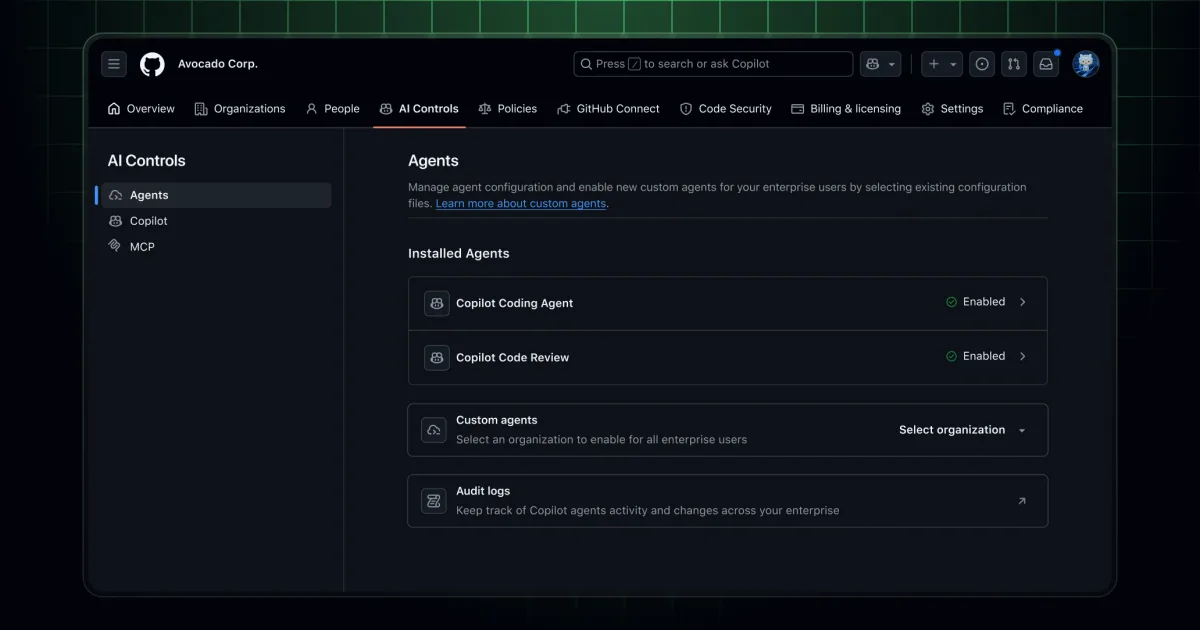
A new administrative experience for AI systems is now available in public preview to all GitHub Enterprise Cloud customers running Copilot. The offering, known as the agent control plane, bundles enterprise governance capabilities that enable organizations to exercise greater oversight of agent behavior across their infrastructure.
Enterprise administrators face the dual challenge of rolling out AI capabilities to development teams while maintaining organizational security and compliance. To address this, GitHub is enhancing visibility into agent operations, strengthening audit trails, and introducing features that prepare custom agents for enterprise deployment. Tracking what agents are performing within an enterprise environment is now substantially simpler.
Core features of the agent control plane
- A single dashboard and unified navigation structure for all AI system administration tasks within GitHub
- Capability to oversee an organization's agent infrastructure, from current deployments to anticipated growth across thousands of agents
- Centralized location for enterprise-wide policies and settings governing Copilot and other AI-related systems
Readying custom agents for the enterprise
- Designate a single organization as the repository for enterprise-standard custom agents
- Apply a one-click push rule to lock down the static file location for custom agents (.github/agents/*.md) across the enterprise against unauthorized modifications
- Fine-tune push rules to align with organizational structure and risk tolerance for testing
- Pick Enterprise-defined custom agents when setting up the Copilot coding agent for any issue
Agent session activity
- View all agent sessions across the enterprise from the preceding 24-hour window
- Sort by agent category and session outcome (such as done, stopped, or running)
- Jump to the relevant repository directly, subject to access permissions
Agentic audit logs
- Expanded fields capturing agent operations (for instance, pull_request.create initiated by Copilot) with an actor_is_agent identifier to pinpoint whether an action came from an agent
- User and user_id fields that reveal which person the agent was executing actions for
- New agent_session.task event that documents when sessions begin, conclude, or encounter failure
- Quick access to agent-related audit logs from the AI controls interface
AI administration fine-grained permissions coming soon
Most enterprises distribute AI and Copilot administration responsibilities across multiple team members, and that group typically does not oversee the entire GitHub Enterprise deployment. Starting later this week, administrators can:
- Leverage a fresh fine-grained permission that unlocks the AI controls interface
- Establish an enterprise custom role to distribute AI system administration without conferring full enterprise administrator privileges
- Assign the enterprise custom role to an enterprise team to manage governance at scale
MCP enterprise allowlist
- Set organization-wide MCP allowlist by specifying MCP registry URL to control MCP connections in VS Code Insiders
- Manage MCP policies through the AI controls interface
- Exclude local servers from the registry to block potentially unsafe tools
General availability support for VS Code and additional integrated development environments is planned for the near future.